What Is End-to-End Encryption in Secret Sharing?
Some secret-sharing tools encrypt a secret on their server. Others use end-to-end encryption in secret sharing: the secret is encrypted in your browser before it is sent. The difference decides who could read your secret if the server were compromised, so it is worth understanding.
Server-side encryption
Your browser sends the secret over HTTPS, and the server encrypts it before storing it. This protects the stored data, but the server briefly handles the readable secret and holds the keys, so a compromise of the server could expose it.
Browser-side (end-to-end) encryption
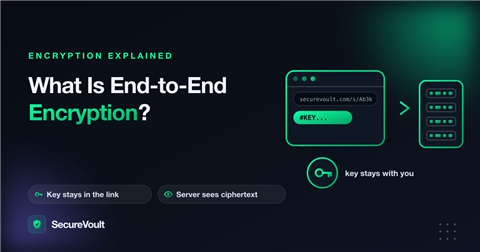
Your browser creates a random key and encrypts the secret before anything is sent. The server receives only ciphertext, which it cannot read. The recipient’s browser decrypts it with the key from the link.
Where does the key go?
The key is placed in the fragment of the link, the part after the # sign. By design, browsers do not include the fragment in the requests they send, so the key does not reach the server in normal use. Anyone with the full link can decrypt, so the link itself is the secret and should be sent carefully.
What about a passphrase?
A passphrase adds a second ingredient. A good design stretches it into two values: one that helps form the encryption key, and one used only as a proof the server can check. Then the server can limit guesses without ever being able to decrypt.
The limits to know about
- The website delivers the encryption code, so you are trusting that it serves honest code. This is true for every browser-based tool.
- If the sender’s or recipient’s device is compromised, no tool can protect the secret.
- Anything the server still handles, such as email notifications or file attachments in some tools, may not be covered, so check what a tool encrypts and what it does not.
A simple picture
Think of the secret as a letter in a locked box. With server-side encryption, you hand the open letter to the post office, which locks it in its own box and promises to keep the key safe. With end-to-end encryption, you lock the box yourself and send only the locked box. The post office carries it but never has the key, and you give the key to the recipient separately.
In secret sharing, the “key” is a long random string in the link, and the “locked box” is the encrypted text stored on the server.
Questions to ask any tool
- Is the secret encrypted in my browser before it is sent, or on the server?
- Where does the decryption key live, and can the server ever see it?
- Which features are covered? File attachments, email notifications and chat are sometimes handled differently from text.
- What does the service log, and for how long?
- Can I read the code or host it myself if I need to?
What encryption does not protect against
- A recipient who copies the secret and shares it further.
- Someone who obtains the full link before the intended person opens it.
- Malware or a compromised browser on either device.
- Mistakes such as sending the link and the passphrase together.
How to use it well
- Send the link only to the person who needs it.
- Use a short expiry and a single view.
- Add a passphrase for sensitive items and send it by another channel.
- Ask the recipient to confirm they have saved the secret, and change it afterwards if it can be changed.
Frequently asked questions
What is the difference between end-to-end and server-side encryption?
With end-to-end encryption the secret is encrypted in the sender’s browser and only decrypted by the recipient, so the server stores ciphertext it cannot read. With server-side encryption the server performs the encryption and holds the keys.
Does the server ever see the key in the link?
In normal use, no. The key sits after the # sign in the link, and browsers do not send that part to the server.
Is browser-based encryption completely trustless?
No. The website delivers the encryption code, so you rely on it serving honest code. If that is not acceptable for your threat model, use a tool you host yourself or run locally.
A safer way to share secrets
See exactly what SecureVoult encrypts, and what it does not. Read how SecureVoult protects secrets. By default, SecureVoult shows a secret once and then deletes it, so nothing is left behind in email, chat or tickets.
Keep reading:
Share a secret now
Create a one-time, self-destructing link in seconds. No account needed.
Create a secret link